
watch file modified: .gitconfig
Something is modifying my global .gitconfig /Users/cox/.dotfiles/.gitconfig. It deletes "name" and "email" values.
To watch when it is happenig I let launchd watch modification of this file.
I have a plist file for launchd with the arguments. This file is ~/Library/LaunchAgents/gitconfig.modified.watch.plist
It's content:
<?xml version=“1.0” encoding=“UTF-8”?>
<!DOCTYPE plist PUBLIC “-//Apple//DTD PLIST 1.0//EN” “http://www.apple.com/DTDs/PropertyList-1.0.dtd”>
<plist version=“1.0”>
<dict>
        <key>Label</key>
        <string>gitconfig.modified.watch</string>
        <key>ProgramArguments</key>
        <array>
                <string>/Users/cox/.scripts/watch_file_modified</string>
        </array>
        <key>WatchPaths</key>
        <array>
                <string>/Users/cox/.dotfiles/.gitconfig</string>
        </array>
</dict>
</plist>
Line 6: name of the plist file w/o plist extension.
Line 9: the shell script fired if modification is detected
Line 11: the launchd command: watch for path modification
Line 13: the file to watch
The content of the fired shell script /Users/cox/.scripts/watch_file_modified:
#! /bin/sh

now="$(date)"
echo "cd ~/.dotfiles && git diff .gitconfig && -" | pbcopy
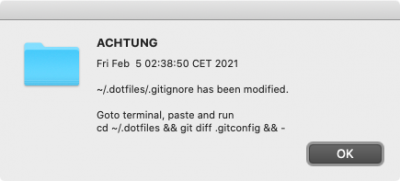
osascript -e 'display alert "ACHTUNG" message "'"$now"'\n\n~/.dotfiles/.gitignore has been modified.\n\nGoto terminal, paste and run\ncd ~/.dotfiles && git diff .gitconfig && -"'
It starts an apple popup with OK button including date and message. (If later another file should be watch you have to change the message too.)
To start the deamon run (what is already done - 2021/02/05 01:30 CET - and should start after every reboot automatically):
launchctl load ~/Library/LaunchAgents/gitconfig.modified.watch.plistTo stop it if the problem is identified and solved:
launchctl unload -w ~/Library/LaunchAgents/gitconfig.modified.watch.plistBoth plist file and shell script can be deleted then. But maybe keep them for a problem like this later.
-
launchctl load <path>: Loads and starts the job as long as the job is not "disabled." -
launchctl unload <path>: Stops and unloads the job. The job will still restart on the next login/reboot. -
launchctl load -w <path>: Loads and starts the job while also marking the job as "not disabled." The job will restart on the next login/reboot. -
launchctl unload -w <path>: Stops and unloads and disables the job. The job will NOT restart on the next login/restart.
No comments to display
No comments to display